Breach the Bastion Spire Deck Builder How to Redeem Codes
Menu → Codes tab → paste → Redeem, with Map Ink notes and fixes when a code fails.
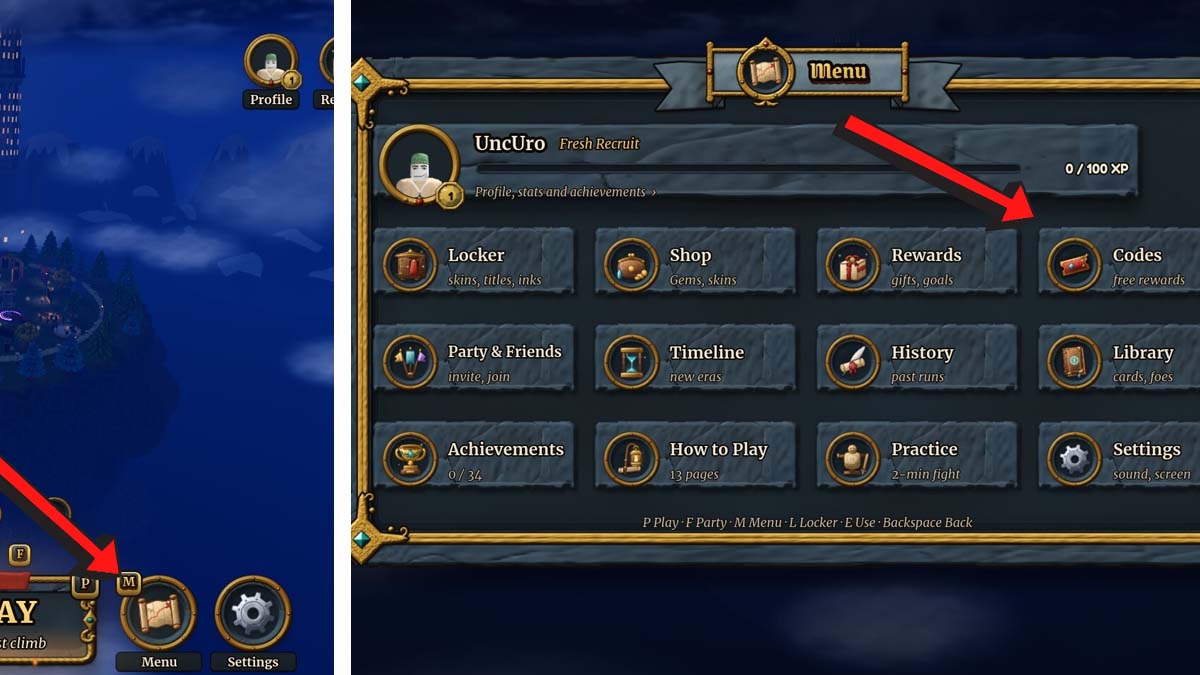
Redeeming codes in Breach the Bastion: Spire Deck Builder takes less than a minute once you know where the Menu lives. This walkthrough covers the exact in-game path, what Map Ink looks like when it lands, and the failure cases that waste the most time for new players.
Before you start
- Launch Roblox and open Breach the Bastion: Spire Deck Builder.
- Wait until the HUD finishes loading—the bottom Menu icon will not respond during the initial join fade.
- Keep the latest working code ready. Right now that is 1KCCU for Random Map Ink. Confirm status on the Codes Hub so you are not pasting the expired 500CCU string.
- If you play on a shared PC, make sure you are on your Roblox account. Codes grant rewards to the account that redeems them.
Step-by-step redemption
- Open the Menu. Look for the Menu icon along the bottom of the screen. Tap or click it once; do not confuse it with combat or map buttons that sit elsewhere on the HUD.
- Open the Codes tab. Inside the Menu panel you will see several tabs. Select Codes.
- Paste the code. Click the input field and paste
1KCCU(or whatever active code you are claiming). Avoid typing by hand if you can—capital letters and zero/O mix-ups are the top cause of “invalid” messages. - Press Redeem. Wait for the confirmation toast or inventory update. Do not mash Redeem repeatedly; one clean submit is enough.
- Verify the reward. Check that Map Ink (or the listed reward) appears before you dive into a multi-floor climb. If the UI closes without feedback, reopen Codes once and confirm the code is no longer needed—or try again after a few seconds.
That is the entire loop: Menu → Codes → paste → Redeem. There is no separate Roblox.com redemption page for these strings, and Discord bots cannot inject the reward for you.
What Map Ink is
Map Ink is the in-game reward currently tied to the active milestone code. Treat it as a map-oriented gift—something that supports how you browse, mark, or style route-related progress rather than a combat card you draft mid-fight. Because codes can expire without much warning, redeem Map Ink the moment you see a new CCU-style code instead of “saving it for later” across a long co-op night.
Map Ink does not replace deck-building skill. After you claim it, still follow a sensible first-floor plan from Getting Started and keep an eye on elites versus safe nodes when you path.
Co-op redeem etiquette
Breach the Bastion supports solo or co-op with up to three friends (four players total). Codes are per account:
- Each teammate must open their own Menu and redeem.
- Hosting the lobby does not auto-grant Map Ink to guests.
- If someone joins mid-session, give them thirty seconds to redeem before you commit to a hard elite path.
A quick voice callout—“codes before floor one”—saves the awkward pause when someone realizes they forgot 1KCCU after the first combat.
Troubleshooting
“Invalid” or “doesn’t work”
- Confirm the code is still listed as Active on the Codes Hub. 500CCU is expired.
- Remove spaces before/after the string.
- Re-copy from the hub instead of a blurry screenshot.
- Leave the Codes tab, reopen it, and try once more.
No Menu icon
- Finish the join / loading sequence.
- Check that another full-screen panel (settings, party invite, shop) is not covering the bottom bar.
- Rejoin the server if the HUD failed to replicate.
Redeemed but no visible reward
- Look for a toast or bag/inventory update rather than expecting a new starter card.
- Soft rejoin once; delayed grants sometimes appear after a refresh.
- If nothing arrives and the code now reads as already used, the grant likely succeeded—search inventory for Map Ink before filing a bug report.
Wrong experience
Make sure the Roblox place title matches Breach the Bastion: Spire Deck Builder from Cheesy Games Studios OriginalsTM. Fan copies or similarly named experiences will not accept these codes.
Where to find new codes first
- Cheesy Games Discord — announcement and codes chatter.
- This wiki’s Codes Hub — verified Active / Expired tables.
- Official Links — always-current Discord invite and Roblox game URL.
Avoid random “code generators,” paid unlock sites, or anyone asking you to download an executor just to “claim Map Ink.” Legitimate rewards use the in-game Codes tab only.
After a successful redeem
- Start a practice solo run if you are new, or ready up with friends for a four-player climb.
- Note the redeem date in your own checklist so you know when a milestone code was claimed.
- Skim the Updates Hub when a new class or balance patch lands—those drops often arrive with fresh strings.
Related pages
- Codes Hub — active 1KCCU, expired 500CCU, and status tables
- Official Links — Discord and Roblox destinations
- Getting Started — what to do after rewards are claimed
- Run Checklist — pre-run reminder to redeem before pathing
Redeem early, verify Map Ink, then play the deckbuilder—not the Codes tab—for the rest of the night.
Frequently Asked Questions
Quick answers to the most common questions.
What are the exact redeem steps?
Open Breach the Bastion, tap the Menu icon at the bottom of the HUD, open the Codes tab, paste the code, and press Redeem. Wait for confirmation before starting a run.
Can I redeem codes on the Roblox website?
No. Breach the Bastion codes are redeemed inside the experience through the Menu → Codes tab, not on Roblox.com.
Does each co-op player need to redeem separately?
Yes. Map Ink and other code rewards go to the account that submits the code. Every player in a four-person lobby should redeem on their own client.
What should I do if 1KCCU fails?
Check that you did not paste the expired 500CCU code, remove extra spaces, re-copy from the Codes Hub, and retry once after reopening the Codes tab.
Is Map Ink a combat card?
No. Map Ink is an in-game reward from codes. It supports map-related progress and cosmetics; it is not a starter card you play in combat.